


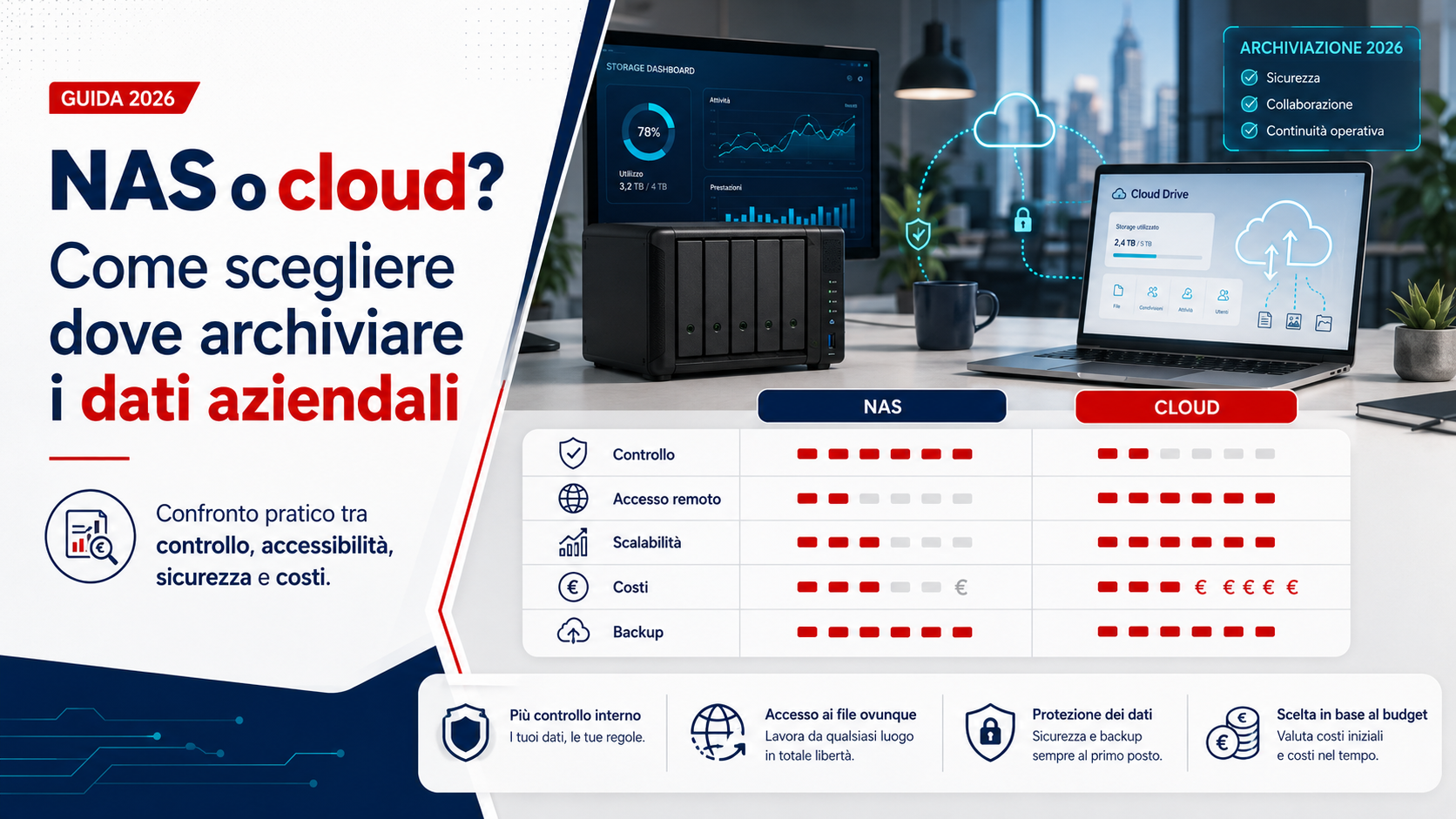
NAS or cloud: which solution should a company choose for storing business data? The answer depends on the type of information being managed, the number of users, the speed of the Internet connection, working arrangements and the required level of security. Both solutions can centralise documents, projects, databases and shared folders, but they operate differently and involve specific advantages, costs and responsibilities.
A NAS stores data on a physical device installed at the company’s premises or another controlled location. Cloud storage uses infrastructure that is accessed through the Internet and managed by an external provider. In many cases, the best choice is not to use one solution exclusively, but to combine them in a hybrid system that provides local speed, remote access and separate backup copies.
What is a NAS?
NAS stands for Network Attached Storage and refers to a storage device connected to a business network. It may contain one or more drives and allows authorised users to access shared folders, documents and resources from computers, laptops and other devices.
Unlike a standard external drive, a NAS is designed to remain available, manage several users and provide features such as separate accounts, permissions, access logs, synchronisation, file versions and backups. Some models also support additional applications, multimedia services, surveillance systems and virtual environments.
Having the device physically located at the company provides more direct control over the information, but it also creates responsibilities for configuration, updates, maintenance and protection against failures and unauthorised access.
What cloud storage means
Cloud storage keeps data and documents on remote infrastructure that is accessed through the Internet. Users can work with files from different devices and locations, according to the permissions assigned and the features offered by the selected service.
The provider normally manages the physical infrastructure, system availability and some technical activities. The company remains responsible for correctly managing accounts, permissions, passwords, multi-factor authentication and the way information is shared.
Cloud services can be used for synchronised folders, collaboration platforms, document archives, backups, databases and business applications. Not every service offers the same guarantees or recovery options, so features, restrictions and contractual conditions must be assessed carefully.
The advantages of a business NAS
One of the main advantages of a NAS is the speed of access through the local network. When users and the device are located at the same premises, the files do not necessarily have to travel through the Internet. This can be useful for large documents, graphics archives, videos, technical projects and frequently used databases.
The main advantages include:
- Fast access through the local network.
- Direct control over hardware, drives and configurations.
- The ability to create customised folders and permissions.
- More predictable costs after the initial investment.
- The possibility of increasing capacity by adding or replacing drives.
- Less dependence on the Internet connection for on-site work.
- Integration with backups, surveillance and other internal services.
For companies that operate primarily from one location and work with large files, a NAS may provide a faster experience than continually transferring information through the Internet.
The limitations and responsibilities of a NAS
Managing a NAS does not end when the device is purchased. User accounts, permissions, updates, notifications, backups and network protections must be configured correctly. A NAS with default credentials, outdated software or uncontrolled remote access can become a risk to the entire organisation.
The device is also exposed to drive failures, electrical problems, overheating, theft, fire, flooding and human error. Using several drives does not automatically remove these risks.
The company must also consider maintenance, component replacement, energy consumption, an uninterruptible power supply and technical support. Without regular management, a NAS can change from a centralised solution into a single point of failure.
The advantages of cloud storage for SMEs
Cloud storage makes remote work and collaboration between people in different locations easier. Documents can be accessed from laptops, smartphones and tablets without necessarily maintaining a server that is directly reachable from outside the company.
The principal advantages include:
- Access to documents from different locations and devices.
- Simpler collaboration between employees, customers and suppliers.
- The ability to increase storage without replacing physical drives.
- Less maintenance of local hardware.
- Version history and deleted-item recovery on many services.
- Integration with email, business applications and productivity tools.
- Centralised procedures for adding and removing users.
For companies with mobile employees, several offices or hybrid working arrangements, the cloud can simplify access to information and reduce the need to create complex connections to internal infrastructure.
The limitations of cloud storage
Cloud storage depends on the Internet connection. If the connection is slow, unstable or unavailable, access to information may become slower or stop completely. Some services allow local synchronised copies, but this feature must be configured and monitored correctly.
The cost is often based on monthly or annual subscriptions linked to the number of users, storage capacity and included features. A solution that is inexpensive initially may become more costly as the workforce and volume of information increase.
The company should also evaluate data-export procedures, recovery times, file-size limitations, external-user management and the consequences of an account suspension or contract termination.
NAS and cloud storage are not automatically backups
Storage, synchronisation and backup are different concepts. Keeping documents on a NAS does not automatically create a backup. If the device fails, is stolen or is affected by an attack, the information may become unavailable.
In the same way, a synchronised cloud folder is not necessarily a backup. When a file is deleted, changed or encrypted by malware, the same action may be replicated across other devices and the online platform.
A genuine backup system must keep separate copies, support the recovery of previous versions and be protected against unauthorised changes and deletions. Backup completion should also be monitored and restoration tests performed regularly.
RAID does not mean backup
Many NAS devices use RAID configurations to distribute data across multiple drives. Depending on the selected configuration, the system may remain available when one drive fails. This improves operational continuity, but it does not create a backup.
RAID does not protect against accidental deletion, ransomware, theft, fire, damage to the complete device or configuration mistakes. When a file is deleted, the deletion is normally applied across the RAID system.
A NAS with several drives must therefore still be backed up to a different system, preferably stored at another location or on a suitably protected cloud service.
The 3-2-1 strategy for business data
One widely used approach to organising backups is the 3-2-1 rule. The principle is to keep at least three copies of the data, use at least two different technologies or types of storage and maintain at least one copy in a separate location.
A company could, for example, store working files on a NAS, create a copy on a second device and send an additional encrypted backup to the cloud. Alternatively, important documents could be stored on a cloud platform and backed up regularly to a local NAS dedicated to recovery.
The strategy should reflect the value of the information, how frequently it changes and the maximum period for which the company can operate without access to it.
Speed and file size
File size directly affects the decision. Text documents, PDFs and spreadsheets can normally be managed effectively with either a NAS or cloud storage. Videos, graphics projects, technical archives and large databases require more attention to transfer speeds.
A NAS connected to a suitable local network can provide high performance without using the Internet connection. Cloud storage depends on the upload and download speeds available at the company and at the locations from which employees are working.
Before choosing, the company should assess the volume of data transferred each day, the average file size and the number of users who need simultaneous access. A theoretically suitable solution may become impractical when synchronisation takes too long.
Remote access and hybrid working
Cloud services are generally designed for remote access and allow users to work from different locations through applications and browsers. A NAS can provide similar functions, but external access must be configured carefully.
Directly exposing an administration panel or storage service to the Internet may increase risk. Controlled solutions, encrypted connections, multi-factor authentication and procedures that restrict access to authorised users should be preferred.
When remote work is frequent, usability must also be considered. An excessively complicated configuration may encourage unsafe alternatives, such as sending documents through personal accounts or unapproved services.
Permissions, accounts and document sharing
Both NAS and cloud environments should be configured according to the principle of least privilege. Each user should access only the folders and information required for their work.
Shared accounts should be avoided, active users should be reviewed regularly and access for former employees and contractors should be removed promptly. Administrator profiles should remain separate from accounts used for everyday work.
In the cloud, public links and external users must also be checked. On a NAS, shared folders, active protocols and access granted through the local network or remote connections require regular review.
Protection against ransomware and accidental deletion
Ransomware can encrypt files that are accessible to a compromised account, including network folders and synchronised resources. Keeping several copies is therefore not sufficient when the same user or device can modify all of them.
File versions, immutable copies, separate backup accounts and suitable retention periods should be considered. Standard users should not have the ability to delete every backup copy directly.
Notifications are also important. Backup errors, unusual login attempts, insufficient space and degraded drives should generate alerts that are actually reviewed and acted upon.
Business continuity and recovery times
The choice between NAS and cloud should consider how quickly the company must become operational after a problem. Recovering a small number of documents is different from restoring several terabytes of data or a complete shared archive.
A cloud backup may remain protected and available after an incident at the company’s premises, but restoring a large volume of information may take time. A local copy may provide faster recovery, but it could be affected by the same incident as the main systems.
For critical information, the company should define how long it can wait for recovery and how much recent data it can accept losing. These objectives help determine backup frequency, the number of copies and the most appropriate technology.
Initial and recurring costs
A NAS normally requires an initial investment in the device, drives, power protection and configuration. Maintenance, energy use, drive replacement and technical support must then be considered over time.
Cloud storage reduces the purchase of local hardware but involves recurring costs that may increase with storage, users, traffic and additional features. Costs should therefore be calculated over several years rather than only for the first month.
The time required to administer the system should also be included. A less expensive solution that is difficult to manage may generate more support requests, errors and operational interruptions.
Privacy, location and control of data
When personal information, confidential documents or customer data are stored, the company should know who can access them, where they are kept and which parties are involved in processing them.
With a NAS, the company directly controls the physical device, but must also protect and manage it correctly. With the cloud, part of the infrastructure is entrusted to the provider, so contractual conditions, security measures, export procedures and incident-management arrangements must be assessed.
The decision should not be based on the assumption that a NAS is always private or that cloud storage is automatically secure. Both require suitable configurations, clear responsibilities and periodic checks.
When a NAS may be the primary choice
A NAS may be appropriate when the company operates mainly from one location, manages large files, has a fast local network and wants greater direct control over its infrastructure.
It may be suitable for:
- Graphics studios and agencies working with large files.
- Technical offices managing projects and local archives.
- Companies with slow or unreliable Internet connections.
- Organisations using applications that depend on local network paths.
- Businesses whose employees work mainly from the same premises.
- Companies with technical support available to manage the device.
Even in these situations, the NAS should be supported by an external backup and tested recovery procedures.
When cloud storage may be the primary choice
Cloud storage may be preferable when users work from different locations, the company has several offices or collaboration on documents is an important part of daily operations.
It may be suitable for:
- Companies with hybrid or fully remote working arrangements.
- Employees who frequently use laptops and mobile devices.
- Organisations operating from several geographical locations.
- Teams that edit shared documents simultaneously.
- Businesses that want to reduce internally installed hardware.
- Companies that need to add users and storage capacity quickly.
Cloud storage should still be supported by retention policies, multi-factor authentication, sharing controls and independent copies of critical data.
The hybrid solution: using NAS and cloud together
For many SMEs, the most balanced solution is to use NAS and cloud storage together. The NAS can store files that are frequently used at the office, while the cloud provides remote access, collaboration and a separate copy.
A hybrid configuration may include:
- Primary working data stored on the NAS.
- Controlled synchronisation of folders required for remote work.
- An encrypted NAS backup sent to a cloud service.
- File versions and retention periods for recovering changed or deleted documents.
- Separate accounts for users, administrators and backup operations.
- Periodic testing of local and remote restoration procedures.
A hybrid system reduces dependence on a single solution, but it must be designed carefully. Simple synchronisation between a NAS and the cloud may also replicate deletions and encrypted files unless protected versions and backup copies are configured.
Questions to ask before making a decision
Before choosing where to store business data, the company should answer the following questions:
- Which information must be stored and how much space does it require?
- How quickly will the volume of data increase?
- From which locations and devices must it be accessed?
- How many users work on the same documents simultaneously?
- How fast and reliable is the Internet connection?
- Which information is most important to business continuity?
- How long can the company remain unable to access its systems?
- Who will manage users, updates, backups and restoration?
- How will the data be protected from deletion and ransomware?
- How can all information be exported in the future?
Clear answers help prevent the adoption of systems that are oversized, insufficient or difficult to manage.
Common mistakes to avoid
One of the most common mistakes is choosing solely according to the cost of storage capacity. Capacity is important, but it must be considered together with security, recovery, performance, sharing and maintenance.
Mistakes to avoid include:
- Treating RAID as a backup.
- Treating cloud synchronisation as a complete backup.
- Exposing a NAS directly to the Internet without adequate protection.
- Using shared accounts for several people.
- Failing to activate multi-factor authentication for cloud accounts.
- Keeping every copy in the same building.
- Failing to perform regular restoration tests.
- Ignoring notifications, degraded drives and failed backups.
- Not checking how information can be exported from the cloud service.
- Purchasing a NAS without planning maintenance and technical support.
Effective storage depends not only on the technology selected, but also on the procedures used to manage it over time.
The role of Azienda Digitale
In this context, Azienda Digitale can support SMEs, professionals and organisations in choosing between NAS, cloud storage and hybrid systems. The assessment should begin with the information being managed, working arrangements, network speed and business-continuity requirements.
Support may include storage-capacity planning, account configuration, permission management, NAS installation, cloud-service selection, document migration and backup preparation.
NAS and cloud storage are not competing solutions in every situation. They can perform different roles within the same strategy. The correct choice allows users to access information easily, protect it against failures and incidents and recover it within a period that is compatible with the company’s requirements.
Frequently Asked Questions
Is a NAS or cloud storage more secure?
Neither solution is automatically more secure. Security depends on configuration, updates, authentication, permissions, backups and access controls. A badly configured NAS and a poorly protected cloud account can both expose business data.
Is a NAS with two drives already a backup?
No. Multiple drives may improve continuity when one drive fails, but they do not protect against deletion, ransomware, theft, fire or damage to the complete device.
Does storing files in the cloud replace backups?
Not always. Synchronisation can replicate unwanted deletions and changes. File versions, retention periods and the availability of an independent copy must be checked.
Can a NAS be used remotely?
Yes, but remote access should use encrypted connections, appropriate authentication and clearly defined restrictions. The device’s administration services should not be exposed directly to the Internet.
Which solution is suitable for a company with several offices?
Cloud storage or a hybrid configuration can simplify sharing between locations. Internet speed, file sizes, security and local-copy requirements must still be considered.
When is it useful to combine NAS and cloud storage?
The combination is useful when the company wants fast local access, remote-working capabilities and a copy of its information stored on separate infrastructure.
Do you need to choose between NAS, cloud storage or a hybrid solution to organise and protect your company’s data?
Azienda Digitale
can help you design a secure and accessible storage system suited to your organisation’s actual requirements.