



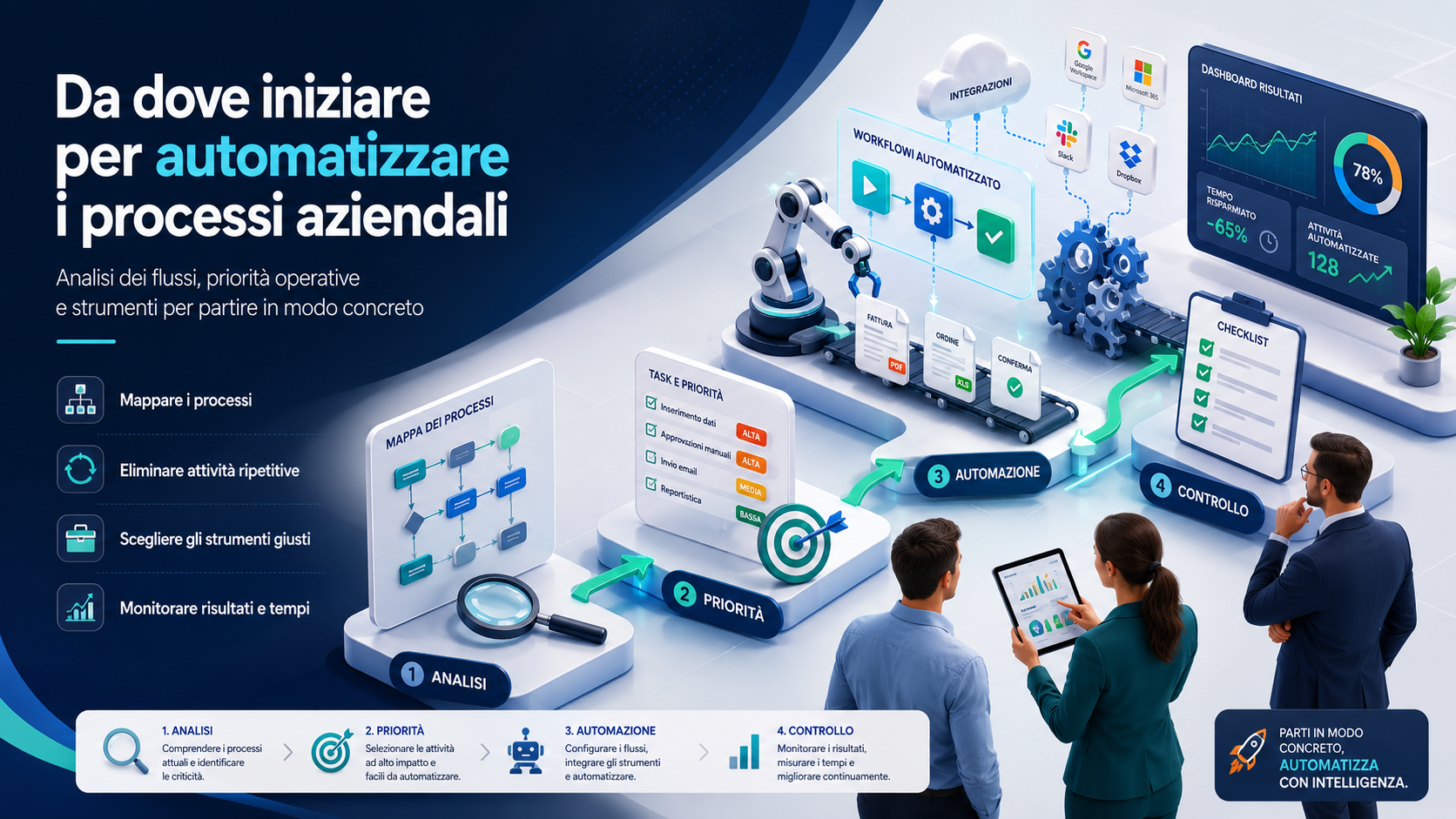
Business-process automation means using software, integrations and operational rules to perform repetitive activities with less manual intervention. The objective should not be to replace people indiscriminately, but to remove duplicated data entry, repetitive checks, manual transfers and routine communications.
For an SME, the starting point is not the purchase of a complex platform. Before choosing a CRM, ERP, no-code product, artificial-intelligence service or custom application, the company should understand which activities consume time, where errors occur and which information is manually transferred between people and systems.
An effective project begins with a clearly defined process, measurable objectives and assigned responsibilities. Automating everything simultaneously increases cost and risk, while a pilot project allows the organisation to verify results, correct problems and create a method that can later be extended.
What business-process automation means
A business process is a sequence of activities that produces a result. It may involve managing a sales enquiry, approving a quotation, entering an order, delivering a product, recording an invoice or opening a support ticket.
Automation can manage activities such as:
- Collecting data from an online form.
- Creating a contact in the CRM.
- Assigning a request to the correct department.
- Sending a confirmation to the customer.
- Creating a task with a deadline.
- Transferring an order to the management system.
- Updating the status of a case.
- Warning a manager when a delay occurs.
- Preparing a recurring report.
- Archiving documents according to defined rules.
The company remains responsible for the process, while the most predictable tasks are performed by systems that apply consistent rules and record their actions.
Digitisation and automation are not the same
Digitisation means moving a paper-based or analogue activity into a digital environment. Automation means allowing one or more steps to be performed without requiring a person to start or complete them manually every time.
Completing a PDF instead of a paper form is digitisation. Automatically using the submitted information to create a case, send a notification and assign a task is automation.
A process may be digital and still inefficient. Copying information from an email into a spreadsheet and then into a management system uses digital tools but retains duplication and the risk of error.
Signs that a process should be automated
Not every activity should be automated. Certain recurring problems, however, indicate that a process is consuming more resources than necessary.
- The same information is entered into several systems.
- Activities depend on informal emails and messages.
- Deadlines are remembered manually.
- Requests remain without an assigned owner.
- Employees repeatedly prepare the same documents.
- Customers wait for confirmations that could be immediate.
- Errors are discovered only at the end of the process.
- The status of a case is difficult to identify.
- One absent employee blocks other people’s work.
- Reports require manual collection from several sources.
These problems do not automatically identify the correct technology. They identify where the analysis should begin.
Start with objectives rather than software
A common mistake is purchasing a platform because it offers many automation features without first defining the required outcome. Technology should be selected only after objectives, users and processes have been clarified.
Possible objectives include:
- Reducing customer-response times.
- Eliminating duplicated data entry.
- Reducing order errors.
- Ensuring that every request has an owner.
- Accelerating document approval.
- Viewing the status of activities in real time.
- Reducing the time required to prepare reports.
- Making a process less dependent on one person.
- Improving traceability.
An objective such as “automate administration” is too broad. A clearer objective would be reducing the time needed to record and classify incoming invoices.
Map the current process
Before changing a process, the company must describe how it actually works. Formal procedures do not always reflect daily work because employees may use personal spreadsheets, emails, informal checks and undocumented exceptions.
The process map should identify:
- What starts the process.
- Which employees and departments participate.
- Which information is collected.
- Which applications and documents are used.
- Which decisions must be made.
- Where delays occur.
- Which steps are repeated.
- Which exceptions may arise.
- How completion is confirmed.
The people performing the work should be involved. They can reveal practical issues that do not appear in procedure manuals or management meetings.
Do not automate an inefficient process
Automating a disorganised process may simply accelerate errors, duplication and unnecessary approvals. Before introducing technology, the company should determine whether some steps can be removed, combined or simplified.
Useful questions include:
- Is this activity still necessary?
- Is the information already available in another system?
- Does this approval provide a genuine control?
- Can the document be replaced by structured information?
- Are several people performing the same check?
- Can the number of exceptions be reduced?
- Can the customer enter some information directly?
Simplifying before automating reduces implementation costs and future maintenance.
Choose an appropriate first process
The first project should be important enough to produce a visible benefit but not so critical that experimental problems create unacceptable risk.
A good pilot process is usually:
- Performed frequently.
- Based on reasonably predictable rules.
- Dependent on repetitive manual work.
- Associated with measurable errors or delays.
- Limited to a manageable number of users.
- Supported by relatively organised data.
- Easy to monitor after automation.
- Capable of producing an obvious benefit.
Useful starting points include assigning website enquiries, sending quotation reminders, archiving documents, handling internal requests and preparing recurring reports.
Assess impact and complexity
Processes can be prioritised by comparing the expected benefit with the difficulty of implementation.
- High impact and low complexity: the best candidates for an initial project.
- High impact and high complexity: important projects requiring structured planning.
- Low impact and low complexity: minor improvements that may follow later.
- Low impact and high complexity: activities that should normally be postponed or avoided.
Complexity increases when several systems, unreliable data, approvals, security requirements and frequent exceptions are involved.
Check data quality
Automation works correctly only when it receives consistent information. Duplicate records, missing fields, inconsistent categories and outdated data can cause incorrect assignments, unsuitable communications and unreliable reports.
Before implementation:
- Identify the primary source of each type of information.
- Remove duplicates.
- Standardise dates, codes, addresses and categories.
- Define mandatory fields.
- Establish who can modify information.
- Validate submitted values.
- Define retention and update periods.
- Clean existing archives before migration.
Automation based on unreliable data may reduce manual effort while increasing the number of errors that require correction.
Assign a process owner
Every automated process should have a business owner. This person does not necessarily develop the technical solution but understands the objectives, rules, users and expected results.
The process owner should:
- Confirm operational rules.
- Approve changes.
- Manage exceptions.
- Review performance indicators.
- Collect user feedback.
- Ensure the automation remains consistent with actual work.
- Coordinate suppliers and technical staff.
Without defined ownership, an automation may continue operating after the business process has changed.
Which tools can be used
The appropriate technology depends on the process. Custom software is not always necessary.
- Existing software features: CRM, ERP and management systems may already provide workflows and notifications.
- No-code and low-code platforms: can connect applications and create workflows with limited programming.
- RPA: can reproduce some user activities in systems without modern integrations.
- APIs and integrations: exchange structured data between applications.
- Artificial intelligence: can support classification, extraction, summarisation and content generation.
- Custom development: is appropriate when standard functions cannot meet essential requirements.
Reliable existing features should generally be considered before additional custom components are introduced.
Rule-based automation and AI automation
Traditional automation follows defined conditions: when an event occurs, the system performs a specified action. It is suitable for predictable processes such as assigning a request according to a selected category.
Artificial intelligence can support situations involving less structured information. It may classify a message, extract information from a document or prepare a draft.
AI-based functions require additional controls:
- Review of the information sent to the service.
- Human validation of important results.
- Management of uncertain cases and errors.
- Logging of important decisions.
- Assessment of supplier terms.
- Restrictions on confidential information.
AI should support the process without automatically controlling sensitive or irreversible decisions.
Integrate systems correctly
Automation projects may connect websites, CRM systems, e-commerce, email, management software and collaboration tools. The integration must define how and when information is transferred.
The company should establish:
- The primary application for each data type.
- Which information must be synchronised.
- Whether information moves in one or both directions.
- How frequently updates occur.
- How errors and duplicates are handled.
- What happens when a service is unavailable.
- Who receives failed-synchronisation alerts.
An integration may appear to work correctly while still producing problems with simultaneous edits, incomplete records and temporary outages.
Security, privacy and access control
An automation may access emails, customer records, documents, orders and administrative information. Technical accounts and integrations should receive only the permissions required.
Important controls include:
- Separate personal and technical accounts.
- Multi-factor authentication for users.
- Role-based access.
- Protection of integration keys and credentials.
- Logging of important operations.
- Data-minimisation rules.
- Access-revocation procedures.
- Backups of configurations.
- Assessment of external suppliers.
- Incident and failure procedures.
An automation should not depend on an employee’s personal account or receive unnecessary administrator privileges.
Manage exceptions and human review
Real processes always contain exceptional situations. Documents may be incomplete, orders may require special handling and customers may appear more than once.
The workflow should define:
- Which conditions allow automatic processing.
- When human validation is required.
- Who handles exceptional cases.
- How long a task may remain suspended.
- How incorrect information is corrected.
- How an operation can be cancelled or repeated.
- How the final decision is recorded.
A well-designed workflow does not hide exceptions. It makes them visible and assigns them to an appropriate person.
Define indicators and measure results
The company should measure the starting situation before implementation. Without a baseline, it is impossible to determine whether the automation has produced a meaningful improvement.
Indicators may include:
- Average completion time.
- Number of manual activities.
- Number of identified errors.
- Cases completed.
- First-response time.
- Overdue or forgotten activities.
- Employee hours used.
- Average cost per operation.
- Internal user satisfaction.
- Customer satisfaction.
Benefits may also include improved continuity, traceability and capacity, rather than only a reduction in working hours.
Run a pilot project
A pilot allows the organisation to test the process with limited users and data, reducing the impact of potential problems.
- Define the process and expected result.
- Select a user group.
- Prepare data and permissions.
- Configure the essential workflow.
- Test standard and exceptional cases.
- Compare results with the previous process.
- Collect user feedback.
- Correct rules and interfaces.
- Document the configuration.
- Decide whether to extend the automation.
The pilot should use realistic data and operational situations rather than only a demonstration prepared by the supplier.
Involve and train employees
Automation changes activities, responsibilities and collaboration methods. Employees need to understand which operations will be performed by the system and which still require their judgement.
Training should explain:
- Why the automation is being introduced.
- Which problems it should solve.
- How to review task status.
- How to manage errors and exceptions.
- Which information must be entered accurately.
- How to report a malfunction.
- Who owns the process.
Early user involvement reduces resistance and produces a solution that reflects actual working conditions.
Document automations and responsibilities
A workflow may remain active for years. Without documentation, the organisation may forget why it was created, which systems it uses and how failures should be handled.
Documentation should include:
- The process objective.
- The event that starts the automation.
- Applied rules and conditions.
- Systems and information involved.
- Required accounts and permissions.
- Exception-handling procedures.
- Business and technical contacts.
- Monitoring and recovery procedures.
- A record of changes.
Documentation reduces dependence on the supplier or employee who originally created the workflow.
Expand automation gradually
After a successful pilot, the same method can be applied to other processes. Expansion should be gradual, with repeated reviews of performance, security and system capacity.
The company should consider:
- The number of users.
- The volume of operations.
- Platform capacity.
- Licence and execution costs.
- Dependence on external services.
- Support requirements.
- Continuity procedures.
- Periodic reviews of rules.
A workflow designed for one hundred monthly operations may need a different configuration when the volume increases to several thousand.
Processes an SME can automate first
- Capturing and assigning sales enquiries.
- Sending quotation follow-up reminders.
- Confirming received requests.
- Collecting and approving leave requests.
- Archiving documents.
- Managing renewal and expiry alerts.
- Creating support tickets from emails.
- Synchronising e-commerce and management systems.
- Updating order status.
- Preparing weekly reports.
- Managing internal purchase requests.
- Extracting initial information from forms and invoices.
The best starting process combines frequency, clear rules, measurable benefit and limited risk.
Common mistakes to avoid
- Purchasing software before analysing the process.
- Automating unnecessary or duplicated activities.
- Starting with an excessively complex process.
- Failing to appoint a process owner.
- Ignoring exceptions and human validation.
- Using incomplete or unreliable data.
- Granting excessive access to integrations.
- Failing to log actions and errors.
- Changing too many processes simultaneously.
- Failing to train users.
- Evaluating the project only by software cost.
- Failing to measure results before and after implementation.
- Failing to document configuration and responsibilities.
- Depending entirely on one person or supplier.
Automation should simplify work and make processes more reliable. A project that adds further manual controls and disconnected systems should be reviewed.
The role of Azienda Digitale
In this context, Azienda Digitale can support SMEs, professionals and organisations in analysing and automating business processes. The work can begin with process mapping, identification of repetitive activities and assessment of the applications already in use.
Support may include objective definition, pilot-process selection, CRM and management-system configuration, application integration, workflow development, data cleaning, permission reviews, testing and user training.
Effective automation does not mean adding technology to every activity. It means using appropriate tools where they can reduce errors, waiting times and repetitive work while retaining human control over important decisions and exceptions.
Frequently Asked Questions
Which process should a company automate first?
A suitable first process is frequent, repetitive, governed by reasonably clear rules and associated with a measurable benefit. It should not initially involve excessive operational risk or the complete organisation.
Is new software always required?
No. Existing CRM, ERP and management platforms may already include unused automation functions. Their capabilities should be assessed before another product is purchased.
What is the difference between automation and artificial intelligence?
Automation performs actions according to defined rules. Artificial intelligence can interpret less structured information and generate probabilistic results that may require human validation.
How long does it take to automate a process?
It depends on the number of steps, data quality, integrations and exceptions. A simple workflow may require days or weeks, while a cross-departmental process may require several months.
How should automation success be measured?
The company should compare before-and-after indicators such as completion time, errors, manual work, costs, delays and user satisfaction. The measures should reflect the original project objective.
Would you like to identify business processes that can be automated and begin with a practical, sustainable project?
Azienda Digitale
can help you map activities, integrate systems and create automations suited to your company’s actual requirements.