


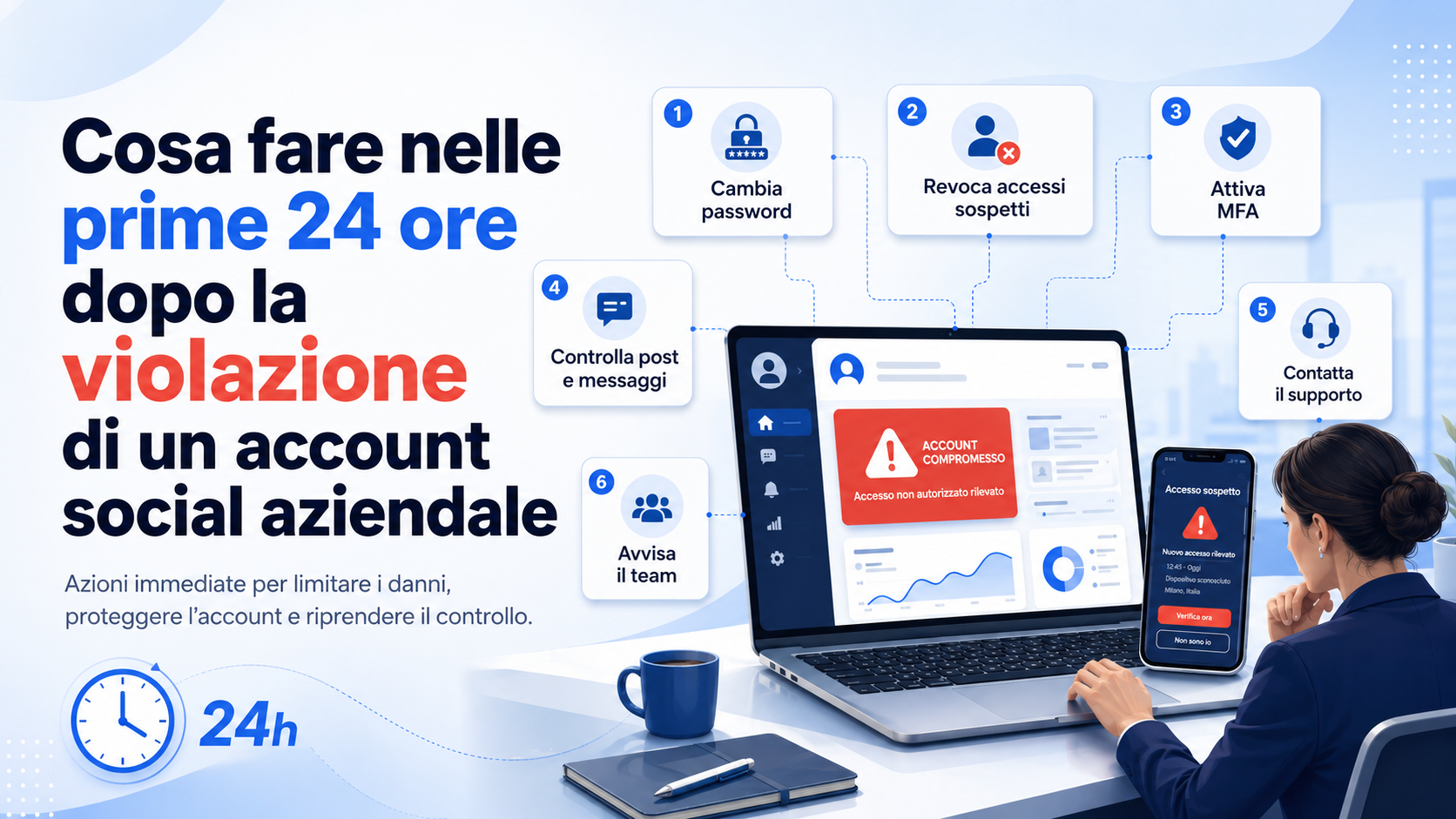
A compromised business social media account can quickly become a security, reputation and business-continuity problem. Unauthorised access may allow an external party to publish fraudulent content, change the company’s profile information, contact customers, spend advertising funds or remove legitimate administrators.
The first 24 hours are particularly important because the actions performed during this period can limit the spread of harmful content, prevent additional access and support account recovery. The company must act quickly, but in an organised way. Deleting everything immediately, using links received by email or changing settings without preserving evidence may make it more difficult to understand what happened.
The response should follow a clear order: verify the incident, protect connected accounts, recover control, stop the attacker’s activity, document the changes and communicate appropriately with customers and employees.
How to recognise a compromised social media account
A compromise does not always cause an immediate loss of access. In some cases, the user can still sign in normally while an unauthorised person uses an active session, connected application or another administrator account.
Common warning signs include:
- Posts, stories, comments or messages not created by the company.
- Changes to the profile name, description, image or contact details.
- New administrators, partners or users with elevated privileges.
- Removal or reduction of legitimate administrators’ permissions.
- Emails concerning unrequested password or contact-detail changes.
- Sign-ins from unknown devices or locations.
- Unauthorised advertising campaigns, advertisements or charges.
- Messages asking customers for payments or directing them to suspicious links.
- Unknown third-party applications connected to the account.
- A sudden inability to sign in.
Even one warning sign should be investigated. It is safer to treat the event initially as a possible compromise and reduce the response after verification than to ignore suspicious activity that may still be continuing.
During the first 15 minutes: limit activity and preserve evidence
The first reaction may be to delete every suspicious item immediately. Before doing so, the company should preserve basic evidence. It may be required by the platform’s support service, internal investigators, payment providers or public authorities.
Screenshots should record:
- Unauthorised posts and messages.
- The date and time when the activity was discovered.
- Security emails and notifications.
- New users, administrators or connected applications.
- Profile and company-information changes.
- Suspicious advertising campaigns and financial activity.
- Unknown devices and active sessions.
Evidence should be stored in a protected folder with details of who collected it and when. Harmful content does not need to remain public for an extended period: once the essential evidence has been preserved, it should be removed quickly.
Appoint an incident coordinator
When several people manage the same account, uncoordinated actions can create confusion. One employee changes the password, another deletes content and a third contacts the platform with different information.
A coordinator should be appointed immediately to manage the response and record decisions. This person does not need to perform every operation but should know who is reviewing account access, advertising activity, customer communications and data-protection implications.
A complex incident may involve:
- The business owner or internal manager.
- The IT provider or security contact.
- The communications and social media team.
- The privacy adviser or data protection officer.
- The finance team where advertisements or charges are involved.
- Legal advisers or the cyber-insurance provider where appropriate.
Secure the connected email account first
The email address associated with a social account is often used to reset the password, confirm changes and recover access. If the email account is also compromised, changing only the social media password may not be sufficient.
The company should immediately:
- Change the email password from a trusted device.
- Review devices, sessions and recent sign-ins.
- Remove unknown recovery addresses and telephone numbers.
- Check for suspicious forwarding and mailbox rules.
- Review applications authorised to access the mailbox.
- Enable multi-factor authentication.
- Store new recovery codes in a protected location.
The email password must be different from the social media password and every other business credential.
Within the first hour: change the password from a trusted device
If the company still has access, the account password should be changed quickly. This must be done from a trusted and updated computer or smartphone that is not suspected of containing malicious software.
The new password should be long, unique and unrelated to information that can be discovered easily. Adding one number or changing a small part of the old password is not sufficient.
If the same credential was used for other services, those passwords must also be replaced. Priority should be given to email, advertising platforms, social media management tools, cloud services and administrator accounts.
When access has been lost, only the platform’s official recovery process should be used. Links received through direct messages, comments or unverified emails may lead to additional phishing attempts.
Terminate sessions and remove unknown devices
Changing the password may not automatically close every active session. The company must review the section covering sign-ins, connected devices and active sessions.
Unknown sessions should be terminated and, where possible, all devices should be signed out. Legitimate administrators can then sign in again with the new credentials.
Suspicious locations, times and devices should be recorded. An unusual location does not necessarily identify the attacker because it may be affected by a VPN, mobile network or intermediary service.
Review administrators, roles and business partners
Business accounts are not always controlled by one password. Pages, professional profiles and advertising platforms may be managed by several users, agencies, partners and administrator accounts.
The review should include:
- Administrators and users with full control.
- Roles assigned to employees and contractors.
- Connected agencies and business partners.
- Associated advertising accounts.
- Payment methods and financial permissions.
- Recently added pages, profiles and resources.
Unknown users must be removed and legitimate permissions reviewed. Before deleting an account, its name, identifier and access level should be recorded as evidence.
Access belonging to former employees, consultants and agencies should also be removed, regardless of whether they were involved in the incident.
Revoke suspicious applications and integrations
Social accounts are often connected to tools for scheduling posts, analysing results, managing messages, advertising and creating content. A compromised or mistakenly approved application may continue operating after the password is changed.
Every connected service should be reviewed. Unknown, unused and unnecessary integrations should be revoked. Browser extensions and applications installed on administrators’ devices should also be checked.
Legitimate integrations can be reconnected after the incident. During the emergency, it is safer to reduce the number of authorised systems and restore them only after verification.
Enable or reconfigure multi-factor authentication
After control has been restored, multi-factor authentication should be enabled for every administrator. If it was already active, the company must make sure that the attacker did not register another device or change the recovery methods.
The review should cover:
- Registered authenticator applications.
- Associated telephone numbers.
- Physical security keys.
- Passkeys and authorised devices.
- Valid recovery codes.
- Recovery email addresses and contact methods.
Phishing-resistant methods, such as passkeys and physical security keys, may be particularly suitable for primary administrators.
Stop advertising campaigns and review charges
A compromised account may be used to create fraudulent advertisements, promote external websites or spend the company’s advertising budget. Financial activity must therefore be reviewed during the first hours.
The company should:
- Pause unrecognised campaigns.
- Review changes to audiences, budgets and destination links.
- Check new advertising accounts and authorised users.
- Review connected cards, accounts and payment methods.
- Preserve screenshots of suspicious campaigns and charges.
- Contact the platform and payment provider where appropriate.
Every payment method should not be removed impulsively before the evidence and consequences have been assessed. The finance team should become involved whenever unauthorised spending is suspected.
Review posts, messages, comments and profile information
After unauthorised access has been stopped, the company must determine what was changed. The attacker may have published content, replied to customers, sent private messages or changed the contact information and links shown on the profile.
The review should cover:
- Posts, stories, videos and scheduled content.
- Sent and received private messages.
- Published comments and replies.
- Links included in the biography and profile information.
- Telephone numbers, email addresses and business locations.
- Automatic messages and predefined replies.
- Catalogues, products and shop links.
- Files and attachments shared during the compromise.
Fraudulent content should be removed after it has been documented. People who received suspicious links, payment requests or false instructions should be identified where possible.
Within four hours: inform employees
Employees and contractors should be informed promptly, particularly when they may receive messages from the compromised account. Internal communication should be clear and limited to confirmed information.
Employees should know:
- Which account was affected.
- Which suspicious activities were identified.
- Which messages and links must not be opened.
- Where additional suspicious activity should be reported.
- Whether they must change passwords or check other accounts.
- Who is authorised to communicate publicly about the incident.
Employees should not publish their own explanations. Uncoordinated communication may create conflicting accounts and additional confusion.
Communicate with customers and followers without creating panic
When fraudulent content or messages have been distributed, the public may need to be informed quickly. Concealing the incident while customers continue to receive false requests can increase the damage.
The communication should state:
- Which account was involved.
- The approximate period of unauthorised activity.
- Which messages or content should be ignored.
- That the company does not request passwords or payments through social messages.
- Which official channel should be used for assistance.
- What people should do if they opened a suspicious link.
The company should not publicly attribute the incident to a person or organisation without evidence. It is safer to communicate confirmed facts and issue updates as new information becomes available.
Assess whether personal data was exposed
A compromised social account is not automatically a personal data breach. It may become one when an unauthorised party accesses messages, names, contact details, orders, support requests or other information relating to identifiable individuals.
The company should assess:
- Which information was accessible through the account.
- Whether the attacker viewed, copied or changed messages.
- How many people may be affected.
- Whether sensitive or financial information was involved.
- Whether the information could be used for fraud or phishing.
- Which measures were taken to limit the consequences.
The assessment should not be postponed until the investigation is complete. Available information can be updated progressively, while legal deadlines may begin when the organisation becomes aware of a possible breach.
Personal data breaches and the 72-hour period
When the incident involves a personal data breach, the controller must document the event and assess the risks to individuals’ rights and freedoms. Where the breach is likely to create a risk, notification to the competent authority may be required without undue delay and, where feasible, within 72 hours of becoming aware of it.
When the risk to affected individuals is high, the company may also need to communicate directly with them. The assessment depends on the nature of the information, the number of people, the possible consequences and the protective measures implemented.
The 72-hour period does not mean that the company can wait three days before beginning the analysis. Evidence collection, privacy assessment and documentation should begin during the first hours.
Check other business accounts
The compromise may not be limited to one social platform. If the attacker obtained a reused password, controlled the email account or compromised an administrator’s device, other business services may also be at risk.
The company should review:
- Other business social media profiles.
- Email and cloud services.
- Social media management and scheduling platforms.
- Advertising and payment accounts.
- The company website, hosting and domain panel.
- CRM, e-commerce and support systems.
- Administrators’ personal profiles used to manage business pages.
Reused passwords must be replaced with unique credentials. Active sessions, recovery details and authorised applications should also be checked on every critical service.
Inspect administrators’ devices
Changing a password will not solve the problem if a computer or smartphone used to manage the account contains malware, a harmful browser extension or unauthorised remote-access software.
The relevant devices should be checked for:
- Operating system and browser updates.
- Recently installed programs and extensions.
- Unknown remote-control software.
- Antivirus or security-platform detections.
- Downloads and attachments opened before the incident.
- Suspicious login requests or sign-in pages.
When there is a credible concern, the device should be removed from administrative use and examined by qualified personnel. New credentials must not be entered on a device that may still be compromised.
Within eight hours: submit an official support request
Even when access has been recovered, the incident should be reported through the platform’s official support centre, particularly when roles, ownership, advertising campaigns or payment methods were changed.
The request should include:
- The name and link of the affected account.
- The approximate date and time of the compromise.
- A description of the unauthorised changes.
- Evidence of ownership or business management.
- Relevant screenshots and notifications.
- Details of users and roles that were added or removed.
- Information about suspicious advertisements and charges.
Profiles that promise account recovery in exchange for payment or request credentials through private messages should not be trusted. Support must be obtained through the platform’s official channels.
Record every action taken
A chronological incident log should be maintained. Even a simple shared document can prevent duplicate operations and provide a clear history of decisions.
Each entry should include:
- Date and time.
- The person who performed the action.
- The account or system involved.
- The change made.
- The result obtained.
- Evidence preserved.
- Outstanding actions.
The log will support the final report, the privacy assessment and improvements to the company’s incident procedures.
From eight to twenty-four hours: monitor new attempts
Recovering the account does not necessarily conclude the incident. The attacker may attempt to return, use another integration or contact customers through an impersonation account.
The company should monitor:
- New login and password-reset notifications.
- Requests to add administrators or partners.
- Changes to recovery email addresses and telephone numbers.
- New advertising campaigns.
- Sent messages and scheduled content.
- Reports received from customers and employees.
- Fake profiles impersonating the company.
Monitoring should continue in the following days, with particular attention to connected services and people who received messages during the compromise.
First 24-hour checklist
By the end of the first day, the company should have completed or started the following activities:
- Preserved screenshots and evidence of unauthorised activity.
- Appointed an incident coordinator.
- Secured the connected email account.
- Changed passwords from a trusted device.
- Terminated unknown sessions and devices.
- Removed unauthorised administrators and partners.
- Revoked suspicious applications and integrations.
- Enabled or reconfigured multi-factor authentication.
- Reviewed advertisements, payment methods and charges.
- Removed fraudulent content after documenting it.
- Informed employees, contractors and customers where necessary.
- Assessed the possible exposure of personal information.
- Checked other accounts and administrators’ devices.
- Submitted a request through the official support service.
- Started monitoring and maintained an incident log.
Common mistakes to avoid
During an emergency, impulsive actions can increase the damage or delay recovery.
Common mistakes include:
- Deleting all content before preserving evidence.
- Changing only the social media password without securing the email account.
- Using a device suspected of being compromised.
- Trusting people who claim to offer recovery assistance through messages.
- Failing to review administrators, partners and connected applications.
- Forgetting advertising campaigns and payment methods.
- Concealing the incident while customers receive fraudulent messages.
- Making public accusations without evidence.
- Delaying the assessment of a possible personal data breach.
- Assuming the incident is over as soon as access is recovered.
The priority is not to resume publishing as quickly as possible. The company must first confirm that access is genuinely under control and that no channel remains available to the attacker.
How to prevent another compromise
After the emergency, the company should identify the cause. The compromise may have resulted from phishing, password reuse, an unprotected device, access retained by a former contractor or an unverified external application.
Preventive measures may include:
- Unique passwords stored in a business password manager.
- Multi-factor authentication for every administrator.
- Fewer users with full administrative control.
- Regular reviews of roles, partners and applications.
- Separate accounts for everyday work and administration.
- Training on phishing and fraudulent access requests.
- Immediate offboarding procedures for employees and suppliers.
- An inventory of social accounts and their owners.
- Protected storage of recovery codes.
- An incident-response and communication plan.
Social media security does not involve only the people who publish content. It includes email, devices, advertising accounts, external partners, recovery procedures and internal organisation.
The role of Azienda Digitale
In this context, Azienda Digitale can support SMEs, professionals and organisations in managing compromised social media accounts and preventing future incidents. An effective response must consider access, devices, email, advertising platforms, connected applications and public communication.
Support may include account recovery, configuration reviews, administrator checks, multi-factor authentication, integration audits and the creation of internal procedures.
Acting correctly during the first 24 hours reduces the risk of fraud, limits reputational damage and preserves the information needed to understand the incident. Speed matters, but it must be combined with coordination, documentation and complete checks.
Frequently Asked Questions
What is the first thing to do when a business social account is compromised?
Quickly document the suspicious activity, secure the connected email account and change the password from a trusted device. Then terminate unknown sessions and review administrators and applications.
Should posts published by the attacker be deleted immediately?
They should be removed quickly, but screenshots and essential evidence should be preserved first. The evidence may support platform recovery, charge disputes and the incident investigation.
Is changing the social media password enough?
No. The company must also review the email account, active sessions, administrators, connected applications, recovery methods and other accounts that used the same password.
When should customers and followers be informed?
They should be informed when fraudulent content, messages or payment requests were distributed. The notice should explain what to ignore and which official channel should be used.
Is a compromised social account always a personal data breach?
Not automatically. It may become one when an unauthorised person accesses messages, contact details, documents or other information relating to identifiable individuals.
How long should the account be monitored after recovery?
Monitoring should be particularly intensive during the first 24 hours and continue during the following days. New sign-ins, role changes, advertisements, messages and recovery attempts should be reviewed.
Has your company’s social media account been compromised, or would you like to prepare a procedure for responding quickly?
Azienda Digitale
can help you recover control, secure access and organise an effective response during the first hours.