


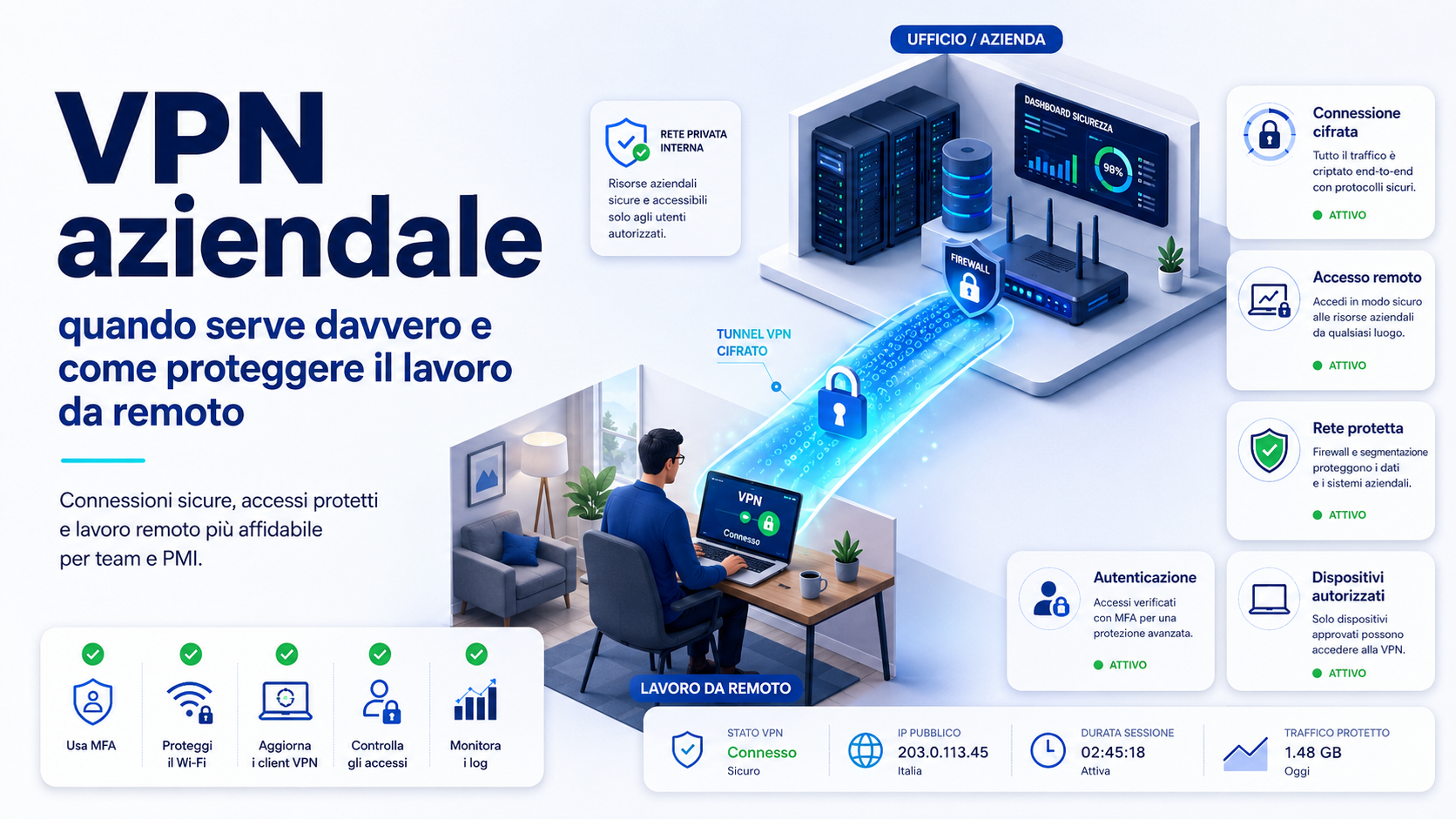
A business VPN can allow employees, contractors and authorised technicians to access files, software, servers and other internal resources remotely. It is particularly useful when some activities must be performed away from the office, but not every organisation requires the same configuration and not every application needs to be reached through a VPN.
Installing a VPN does not automatically make remote work secure. When accounts use weak passwords, devices are not updated or users can access the entire network without restrictions, the encrypted connection may become an entry point to several business systems.
A VPN must therefore form part of a broader strategy that includes multi-factor authentication, managed devices, role-based permissions, updates, monitoring and procedures for revoking access. The correct question is not only which VPN to purchase, but which resources must be accessed, by whom, from which devices and through which controls.
What a business VPN is
VPN stands for Virtual Private Network. It creates a protected connection between the user’s device and a gateway managed by the company or its authorised provider. Through this connection, approved traffic can reach resources that are not normally exposed directly to the Internet.
A VPN may be used to access shared folders, software installed at the company’s premises, internal servers, non-public applications and technical infrastructure. Traffic passing through the tunnel is encrypted, reducing the risk of information being read while it is transmitted.
This protection applies to the connection between the configured points. A VPN does not automatically repair an infected computer, prevent phishing, make a reused password secure or guarantee that every internal application has been configured correctly.
When a VPN is genuinely required
A VPN is particularly useful when employees must access resources located on the internal business network that should not be published on the Internet. The connection allows these systems to remain protected behind the firewall while access is provided only to authorised users.
It may be required to:
- Access shared folders and file servers located at the office.
- Use management software installed on business servers.
- Connect to internal databases and applications.
- Manage infrastructure and technical systems remotely.
- Connect several company locations securely.
- Allow authorised suppliers to work on specific resources.
- Reach printers, document systems and non-public applications.
- Protect business traffic on external networks.
The need should be assessed for each business process. An employee using only email and cloud applications may not need access to the entire corporate network. A technician managing internal servers may require a VPN with precisely defined permissions.
When a VPN may not be necessary
Many modern applications are delivered through the cloud and already use encrypted connections. Email, collaboration platforms, online CRM systems, web-based management tools and document platforms may be accessed through a browser with multi-factor authentication and identity-based controls.
In these cases, forcing every employee to connect to the company network may introduce complexity without providing a proportionate benefit. Protecting each application through centralised authentication, strong identity verification, device restrictions and role-based permissions may be more effective.
A VPN may not be the main solution when:
- All required tools are appropriately protected cloud services.
- The employee does not need access to on-site servers or resources.
- Access can be authorised directly at application level.
- Work is performed from unmanaged personal devices.
- The company wants to provide access to one service rather than the internal network.
- The office connection cannot support all remote traffic.
Not using a VPN does not mean abandoning security. It means choosing an access model suited to the applications actually being used.
Remote-access VPNs and site-to-site VPNs
Business VPNs can be divided into two main categories. One provides remote access for individual users, while the other creates permanent links between networks in different locations.
A remote-access VPN is used by employees, contractors and technicians. The user starts an application or opens a portal, completes authentication and receives the permissions associated with their profile.
A site-to-site VPN connects two or more business networks. It may allow a main office, branch and warehouse to communicate through secure links without requiring every employee to start the connection manually.
Both configurations may be used together. A company with several locations may maintain permanent links between its offices and provide a separate remote-access VPN to employees working from home.
A VPN should not provide unrestricted network access
A common mistake is treating every user as trusted after they connect to the VPN. An employee, supplier or compromised account may then be able to reach systems unrelated to the work being performed.
Access should follow the principle of least privilege. Every person should be able to reach only the resources required for their role.
For example:
- The finance team can access accounting software and financial folders.
- The sales team can reach the CRM and sales documents.
- An external technician can access only the server being maintained.
- A temporary contractor can use only the assigned project resources.
- Administrators access technical functions through separate accounts.
Segmentation limits the consequences of a mistake or stolen account. The presence of a VPN should not remove the access controls already applied to individual applications and folders.
VPNs and the Zero Trust model
A traditional VPN tends to create a connection between the remote device and the internal network. The Zero Trust model begins with the principle that no user, device or connection should be considered automatically trustworthy.
Identity, device condition, application type, risk level and access context can be checked before each resource is authorised. Users receive only the access required instead of becoming virtually present within a broad area of the network.
VPN and Zero Trust approaches are not necessarily alternatives. A VPN can continue to protect certain connections while more granular controls restrict application access and continually verify users and devices.
Always enable multi-factor authentication
A VPN accepts connection requests from the Internet and is therefore an important target for attackers attempting to use stolen credentials. Protecting it with only a username and password increases the risk that phishing or password reuse will expose the business network.
Multi-factor authentication requires another verification method, such as an authentication application, passkey or physical security key. Even when the password has been discovered, access cannot be completed without the additional factor.
MFA should be mandatory for:
- Every employee using the VPN.
- Network and system administrators.
- External suppliers and technicians.
- Accounts with access to confidential data.
- Profiles used to manage the VPN gateway.
Phishing-resistant methods and secure recovery procedures are preferable for the most sensitive accounts.
Use individual accounts rather than shared credentials
Every user should connect through an individual account. Credentials shared among several employees make it impossible to determine who performed an action and difficult to revoke access for one person.
Individual accounts allow the company to apply specific permissions, review activity, configure multi-factor authentication and suspend a profile promptly when employment or responsibilities change.
Administrator accounts should also remain separate from everyday user profiles. A technician should not browse the web, read email and perform ordinary work through the same account used to manage the gateway and internal servers.
Protect and update the VPN gateway
The VPN gateway is directly reachable from outside the company and should be treated as a critical system. Unpatched vulnerabilities, outdated firmware and unsupported configurations may allow unauthorised access even when employee passwords are strong.
The organisation should provide:
- Regular firmware and software updates.
- Rapid installation of fixes for critical vulnerabilities.
- Replacement of equipment that no longer receives support.
- Protected backups of gateway configurations.
- Administrative access limited to authorised personnel.
- Removal of unused functions and protocols.
- Monitoring of service availability and errors.
The administration interface should not be freely available from every Internet address. Management access should be restricted to specific networks, devices and accounts where possible.
Check devices before authorising access
An encrypted connection from a compromised computer can carry malicious activity directly towards business systems. The security of the remote device is therefore as important as that of the gateway.
An authorised computer should be:
- Updated with operating-system security fixes.
- Protected by the company’s antivirus or endpoint-security solution.
- Encrypted to protect information if it is lost.
- Configured with automatic locking and personal credentials.
- Free from unauthorised software.
- Managed according to company requirements.
- Reported promptly if lost or stolen.
More structured solutions can check the device before granting access by verifying updates, active protection and compliance with company settings.
VPN access from personal devices
Allowing access from personal computers may reduce initial costs, but it increases management difficulties. The company may not know which applications are installed, who else uses the device, whether storage is encrypted or whether updates are applied regularly.
When BYOD is permitted, the policy should specify:
- Permitted device types.
- Minimum update and protection requirements.
- Information that may be downloaded locally.
- Separation between personal and business environments.
- Procedures for loss and compromise.
- Checks the company is authorised to perform.
- Removal of access when the working relationship ends.
For sensitive activities, providing a business device or granting access only to one application may be preferable to connecting a personal computer to the internal network.
Protect remote work on public WiFi
Hotels, airports, cafés and shared spaces often provide networks outside the company’s control. A VPN protects traffic routed through its tunnel and can reduce the risks associated with using these connections.
It does not remove every danger. A phishing website remains dangerous through a VPN, as does a malicious attachment or a device that is already compromised.
When working away from the office, employees should:
- Confirm the correct network name before connecting.
- Avoid open networks when a more reliable connection is available.
- Start the VPN before accessing company resources.
- Never ignore certificate warnings and suspicious links.
- Lock the device whenever it is unattended.
- Use a business mobile connection where possible.
Full tunnelling and split tunnelling
A VPN may handle remote traffic in different ways. With full tunnelling, all device traffic passes through the company infrastructure. With split tunnelling, only traffic intended for business resources uses the VPN, while other Internet traffic travels directly.
Full tunnelling provides greater centralised control and can apply business filtering and monitoring to web activity. It requires more capacity at the company’s premises and may increase latency for geographically distant users.
Split tunnelling reduces the load on the company network and may improve the performance of videoconferencing and cloud services. It requires precise configuration to avoid unprotected paths, routing errors and access that is inconsistent with company policy.
The choice should reflect the information being processed, applications, network capacity and controls installed on devices. No single configuration is appropriate for every business.
Size the VPN for the real number of users
A correctly configured VPN may still become slow when the gateway, Internet connection or firewall cannot manage every simultaneous session. The problem becomes evident during meetings, extended remote-working periods and emergencies that require many employees to connect together.
Capacity planning should consider:
- The maximum number of simultaneous users.
- Applications used through the tunnel.
- The size of transferred files.
- The upload capacity of the office connection.
- The processing capacity of the gateway and firewall.
- Videoconferencing and telephony requirements.
- The number of offices and permanent links.
- Expected future growth.
Load tests and performance reviews should be performed during busy periods, not only during installation when few employees are connected.
Why a VPN may slow down the connection
VPN traffic must be encrypted, transmitted to the gateway and then forwarded to the requested resource. This path can increase latency and reduce available speed, particularly when the gateway is distant or overloaded.
Slow performance may be caused by:
- Insufficient upload speed at the company’s premises.
- An undersized gateway.
- Too many simultaneous users.
- Unnecessary traffic being routed through the tunnel.
- A slow or unstable home connection.
- An underpowered remote device.
- Network problems between the user and the office.
- Unoptimised configurations.
Before replacing the solution, the company should identify where the limitation occurs. Testing at the office, from the remote device and through the VPN can help distinguish the causes.
Remote access to office computers
Some companies use the VPN to allow employees to control their office computers remotely. Applications and data remain on the company workstation while the user operates the desktop from another location.
This may be useful for software that cannot be installed on the remote laptop or for data that should not be copied outside the office. The connection must still be protected through suitable gateways and controls.
Remote-control services should not be exposed directly to the Internet. A VPN or protected access system should mediate the connection and enforce multi-factor authentication, permissions, logging and account restrictions.
Manage supplier and technician access
Software suppliers, maintenance providers and consultants may need remote access to company systems. Providing the same access used by employees or a shared administrator account creates unnecessary risk.
External access should be:
- Associated with an identifiable person or company.
- Limited to the systems involved in the work.
- Active only for the required period.
- Protected by multi-factor authentication.
- Logged and reviewed.
- Disabled when the work has been completed.
- Approved by an internal owner.
Sensitive maintenance may use a controlled intermediary workstation, preventing the supplier from connecting directly to several network segments.
Log and monitor access
VPN logs show who connected, when the connection took place, which device was used and whether the attempt succeeded. This information supports the identification of unusual activity, incident investigation and checks that access matches legitimate business activity.
Monitoring may reveal:
- Large numbers of failed authentication attempts.
- Connections from unusual locations.
- Access outside expected working hours.
- Accounts used simultaneously from different devices.
- Connections belonging to inactive users.
- Unusual amounts of transferred data.
- Changes to administrative settings.
Logs must be protected and accessible only to authorised personnel. The company should define retention periods, monitoring purposes and procedures for handling alerts.
Revoke access as soon as it is no longer required
A VPN account may remain active after a contractor leaves, an employee changes role or a supplier is replaced. Forgotten access presents a risk because it may be used without being detected immediately.
The offboarding procedure should include:
- Disabling the VPN account.
- Revoking associated certificates, passkeys and devices.
- Terminating active sessions.
- Removing the user from authorised groups.
- Recovering company devices.
- Reviewing recent access.
- Transferring information and operational responsibilities.
A periodic review should compare authorised users with the employees, contractors and suppliers who are actually active.
Prepare a remote-working policy
Technology is effective only when users understand the rules. A remote-working policy should specify which devices may be used, how to connect, which information can be stored locally and how problems must be reported.
The policy may define:
- Users and roles authorised to use the VPN.
- Permitted devices and minimum requirements.
- Mandatory multi-factor authentication.
- A ban on sharing accounts and credentials.
- Rules for public networks.
- Requirements for storing and printing documents.
- Procedures for lost devices.
- Support and incident-reporting contacts.
- Required checks and updates.
- Access revocation when employment ends.
The policy should be supported by practical training. Users must recognise suspicious login requests, unexpected MFA notifications and pages that imitate the company’s VPN portal.
Prepare an incident procedure
The company must know what to do when an unusual connection is detected, a device is stolen or an employee approves an authentication request by mistake.
The procedure should include:
- Immediate suspension of the affected account.
- Revocation of sessions and associated devices.
- Preservation of logs and notifications.
- Review of resources reached by the user.
- Inspection of the computer or smartphone involved.
- Replacement of connected credentials.
- Involvement of IT, privacy and business contacts.
- Restoration of access only after verification.
A documented procedure reduces containment time and prevents improvised decisions during an emergency.
How to introduce a business VPN step by step
The project should begin with an analysis of business activities rather than the immediate purchase of a device. Users, applications and information must be identified before the service is installed.
- Create an inventory of resources that require remote access.
- Identify authorised employees, contractors and suppliers.
- Define the permissions required by each role.
- Assess Internet, firewall and gateway capacity.
- Select a supported and manageable solution.
- Configure multi-factor authentication and individual accounts.
- Restrict access to the required systems.
- Prepare devices, updates and security controls.
- Test performance, disconnections and account recovery.
- Train users and run a pilot project.
- Monitor logs, capacity and errors.
- Review permissions and configurations periodically.
A pilot project allows compatibility, performance and ease of use to be assessed before remote access is extended to the complete organisation.
Checklist for a more secure business VPN
A periodic review should verify at least the following:
- Updated gateway and software.
- Multi-factor authentication enabled for every user.
- Individual accounts and separate administrator profiles.
- Permissions restricted to required resources.
- Updated and protected business devices.
- Former employees’ and suppliers’ accounts disabled.
- Access logs available and monitored.
- Protected backups of configurations.
- Sufficient capacity for simultaneous connections.
- Supplier access limited in time.
- Tested recovery and incident procedures.
- Updated policies and documentation.
Critical vulnerabilities, suspicious accounts and missing devices must be addressed immediately rather than waiting for the next scheduled review.
Common mistakes to avoid
A badly configured VPN can create a false sense of security. The connection may be encrypted while accounts and devices continue to expose the organisation.
Common mistakes include:
- Protecting the VPN with only a password.
- Allowing every user to access the complete network.
- Sharing accounts between several people.
- Leaving former employees’ and suppliers’ access active.
- Failing to update gateways, firewalls and applications.
- Exposing remote-control services directly to the Internet.
- Allowing personal devices without minimum requirements.
- Failing to monitor connections and failed attempts.
- Underestimating bandwidth and gateway capacity.
- Routing every service through the tunnel without reviewing the need.
- Treating every connected device as trustworthy.
- Failing to prepare procedures for incidents and lost devices.
Security depends on the balance between technology, identities, devices, permissions and continuous monitoring.
The role of Azienda Digitale
In this context, Azienda Digitale can support SMEs, professionals and organisations in assessing and configuring remote access. The analysis should begin with the applications being used, the people involved, the information processed and the structure of the business network.
Support may include VPN design, account configuration, multi-factor authentication, access segmentation, device verification, monitoring and the preparation of remote-working procedures.
A business VPN is genuinely useful when it provides access to internal resources that should not be exposed publicly. To remain effective, it must grant only the permissions required, verify users and devices and remain updated and monitored.
Frequently Asked Questions
Is a business VPN necessary for working from home?
It is necessary when employees must access servers, folders or applications on the internal network. When work uses only protected cloud services, direct application-level access may be more appropriate.
Does a VPN make every device secure?
No. A VPN protects traffic passing through the tunnel but does not remove malware, phishing, outdated software or insecure configurations from the device.
Is multi-factor authentication required?
It is strongly recommended for every remote connection and should be mandatory for administrators, suppliers and accounts that can access important data or systems.
What is the difference between full tunnelling and split tunnelling?
With full tunnelling, all traffic passes through the company infrastructure. With split tunnelling, only traffic intended for business resources uses the VPN. The choice depends on security, performance and applications.
Can a supplier use the same VPN as employees?
The same infrastructure may be used, but the supplier should have an individual account, limited permissions, multi-factor authentication and access that remains active only for the required period.
Does a VPN protect employees on public WiFi?
It protects traffic routed through the tunnel, but it does not prevent users from opening phishing websites, downloading malicious files or using an already compromised device.
Do you need to protect remote work and provide secure access to your company’s resources?
Azienda Digitale
can help you design a reliable VPN, configure permissions and authentication and protect users and devices outside the office.